GPS Speedometer: Speed Tracker
- 4.7
- Rating
- 5.00M
- Installs
- Free
- Price
 Analysis by App-foxy
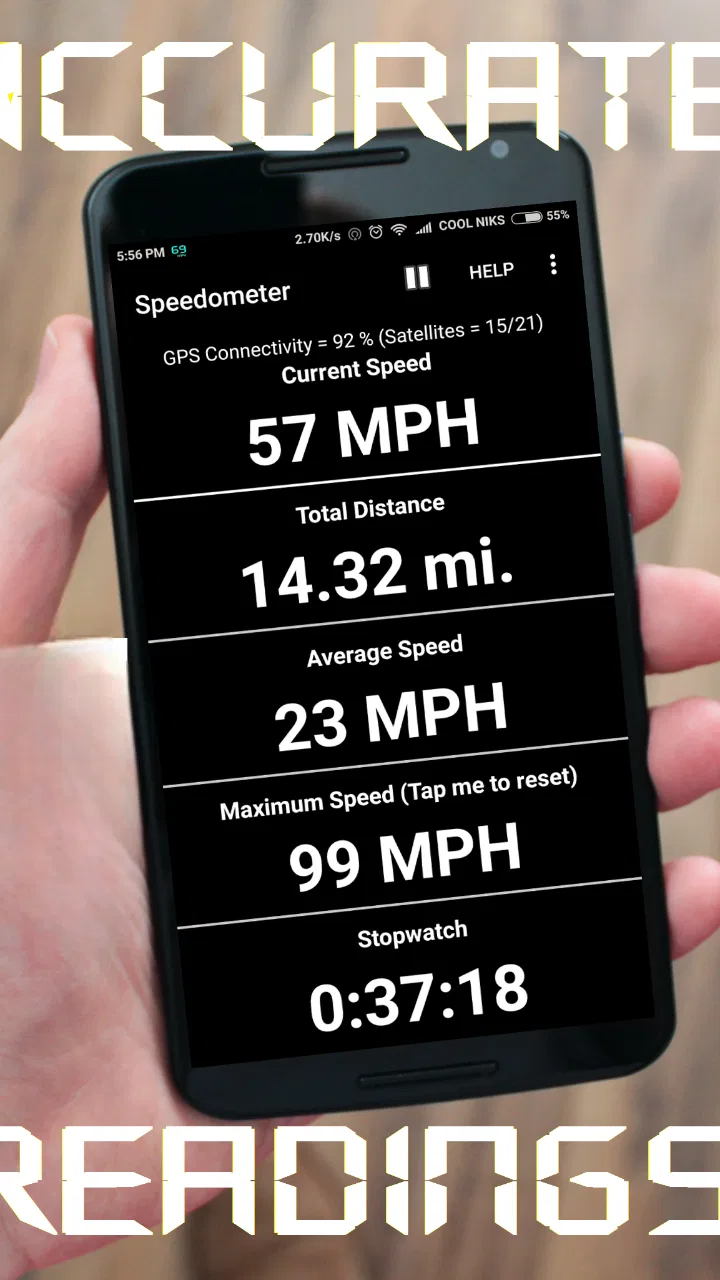
I like navigation tools that do one job clearly, and GPS Speedometer: Speed Tracker fits that idea well. It is a free Android app from COOL NIKS that turns your phone into a live speed and distance display for driving, cycling, or riding in a truck. I tested it with a practical question in mind: is it useful enough to keep open during a journey, or is the regular vehicle dashboard and a full navigation app still the better choice?
My short answer is that it makes sense when you want a focused GPS speedometer rather than maps, route planning, traffic information, or a crowded dashboard. It is especially appealing for an older vehicle, a bicycle, a backup display, or anyone who wants to check trip distance independently. It is not a replacement for every navigation tool, but its narrow purpose is also its main strength.
What I looked for before recommending it
When I judge an app in the Maps & Navigation category, I first ask whether its main information is easy to read while moving. A speed display has to be immediately understandable. If I need to search through menus or interpret several panels before knowing how fast I am traveling, the app has already missed its most important job.
You May Also Like

 Blood Strike: 2.5 Anniversary
Blood Strike’s Loadouts Turn Every Drop Into a Tactical Gamble
A close look at Blood Strike’s custom loadouts: how fast access to signature weapons reshapes its battle royale rhythm, rewards preparation, and narrows the gap between fights.

 Pandora - Music & Podcasts
Pandora’s Music Is Easy to Start, but Harder to Recover
Pandora’s strength is its low-effort path from a seed to a station. Its weak spot is how much confidence it asks you to place in connection, setup, and quiet recovery.

 8 Ball Pool
 Is Built on Rivalries, Rematches, and Routine
A close look at the rivalries, rematches, shared routines, and unanswered safety questions that turn a quick pool match into a persistent mobile community.

 Samsung Music
’s Quiet Strength Is Playing What You Already Own
Its reach comes less from spectacle than from dependable access to a personal library. That simplicity is both the app’s strongest retention engine and its ceiling.

 AccuWeather: Weather Radar
AccuWeather Review: A Quick, Clear Forecast for Everyday Decisions
For everyday plans, the best forecast is the one you can understand quickly. AccuWeather makes rain timing, radar, and local conditions easy to act on, with a few trade-offs.

 Hill Climb Racing
Why Hill Climb Racing Still Turns Crashes Into One More Run
A tiny car, a bumpy hill and one more upgrade: Hill Climb Racing keeps resurfacing because its simple chaos makes every near-miss feel personal.
More From Our News Desk



I also consider how useful the distance tracking is beyond a single glance. An odometer-style reading can help with a cycling session, a delivery route, a road trip, or a vehicle whose built-in distance counter is unreliable. The key question is whether the app gives me a practical second reference, not whether it tries to become a complete navigation suite.
The third decision point is the phone itself. GPS-based speed readings depend on satellite positioning and the way the phone is mounted or carried. That means this app should be treated as a convenient measurement aid, not as a substitute for careful driving or a guaranteed legal instrument. I would mount the phone securely, start the app before moving, and avoid handling it on the road.
Its background also gives me some context. The app was released on May 5, 2016, and the current version is 18.2.0. It supports Android 7.0 and later, so it remains accessible to people using devices that are not particularly new. Its Everyone content rating also makes it straightforward for a broad range of users to consider.
There is clear evidence that many people have found the concept useful: the app has a 4.7 average from around 59 thousand ratings, with over 5 million installs. I would not treat popularity as proof that it will suit every phone or driving situation, but it does make the app feel like an established choice rather than an experiment with no user base.
The simplest everyday test: a second speed display
One realistic use is an older car with a dashboard speedometer that is difficult to read, partially blocked, or simply inconvenient from the driver’s position. I would place the phone in a proper holder before starting the trip, open the app while parked, and use the large live reading as a quick reference. This is more useful than opening a map app and waiting for navigation elements to load when I do not need directions.
A second example is a bicycle ride. A phone mounted on the handlebars can provide a live speed view while the distance reading gives a simple sense of how far the ride has progressed. For this kind of outing, I would value the directness: there is no need to create a route or search for a destination just to see speed and distance.
Truck drivers and people moving between vehicles can also find the independent display helpful. A phone can be moved from one vehicle to another, while a built-in dashboard is tied to the vehicle. That portability is one of the app’s less obvious advantages. It also makes the app useful for checking a vehicle after a dashboard repair or for comparing a vehicle’s own display with a separate GPS-based reading.
Why the focused design works
The strongest part of GPS Speedometer: Speed Tracker is its limited ambition. Many navigation apps put speed somewhere inside a larger interface filled with maps, destinations, route lines, search controls, and alerts. That is excellent when I am traveling somewhere unfamiliar, but unnecessary when I only want a live speed and distance view.
A dedicated display can reduce the number of decisions I make before a trip. Instead of choosing a destination or building a route, I can use the app for the one measurement I need. That makes it a sensible companion for a familiar commute, a test drive, a cycling session, or a journey where another person is handling navigation.
The distance function is also more valuable than it may first appear. I can use it to estimate a short delivery loop, compare the length of two cycling routes, or keep a separate record during a road trip. The important trade-off is that it measures the trip from the moment I begin tracking, so I need to start it at the right time. If I open it halfway through a journey, the reading will not represent the entire outing.
That start point is a small but important workflow detail. I would make a habit of opening the app while parked, checking that the phone has a usable GPS position, and then beginning the trip. For a return journey, I would reset or begin a new session rather than assuming the previous reading will automatically match the new route. This simple routine prevents many misleading distance results.
GPS behavior and the limits I would keep in mind
Because the app relies on GPS positioning, the result can be less dependable in places where the phone has difficulty seeing the sky. Dense city streets, underground car parks, tunnels, covered roads, and areas surrounded by tall buildings can all make a GPS-based speed or distance reading less stable. I would not judge the app harshly for that; it is a limitation of the measurement method rather than a problem unique to this product.
There can also be a delay when a phone first establishes its position. I would give it a moment before moving, especially if the phone has been indoors or has not been used for navigation recently. Starting immediately and then assuming the first displayed value is perfect is a poor workflow for any GPS speed app.
For ordinary travel, this is usually a reasonable convenience. For precise surveying, official mileage records, motorsport timing, or any situation where a measurement has legal or financial consequences, I would choose equipment designed for that purpose. This app is best understood as an accessible everyday indicator.
Phone placement matters too. A device lying flat in a cup holder may be harder to read and more likely to shift. A secure mount keeps the display visible and makes the reading easier to check with a brief glance. I would never hold the phone while driving, and I would set everything up before the vehicle moves.
How it compares with the usual alternatives
The first alternative is the vehicle’s built-in speedometer and odometer. Those are usually the most convenient tools because they are already positioned for the driver and do not depend on a phone battery or mount. If the dashboard is clear and working properly, I would not install this app just to duplicate information I already trust.
The app becomes more interesting when the built-in display is hard to see, when I want an independent reference, or when I am using a bicycle that has no speed display. Its portability gives it an advantage over fixed vehicle instruments, particularly for people who switch between cars, bikes, and trucks.
The second alternative is a full navigation app. That category is better when I need turn-by-turn guidance, destination search, route planning, traffic context, or a map. I would choose that type of app for an unfamiliar city or a long journey where arriving at a specific address matters more than having a clean speed display.
GPS Speedometer: Speed Tracker is the better fit when the route is already known and the measurement itself is the priority. Using a full navigation app for that task can feel like opening a toolbox to use one screwdriver. The broader app may do more, but the focused tool can be quicker to understand.
A third alternative is a cycling computer or dedicated GPS device. Dedicated hardware can be easier to read in bright conditions, more secure on a handlebar, and better suited to people who ride frequently. I would consider one if cycling is a serious routine and I need dependable equipment designed around that activity. For occasional rides, a free phone app is a more sensible starting point.
Who should use it, and who should skip it
I would recommend trying it if you want a simple speed and distance tracker for a car, bike, or truck, especially when you do not need maps. It is a good match for an older Android phone, a spare device used as a dashboard display, or a driver who wants a portable second reference.
It also suits people who dislike installing a large navigation package for a small task. The free price removes the main barrier to testing it, and the broad age rating makes it approachable for families and casual users. I would still make sure the phone is mounted safely and that the driver is not distracted by watching the display continuously.
I would skip it if your main need is navigation. The app’s value comes from focusing on measurement, not from guiding me through complicated roads. I would also skip it as a primary choice for professional, regulated, or highly precise tracking. In those cases, a dedicated instrument or a specialized system is the more responsible option.
People with very old phones should also think about compatibility before planning around it. The minimum requirement is Android 7.0, so devices below that threshold are not suitable. On a supported phone, I would still check the display outdoors and test the mounting position before relying on it during a longer trip.
The switching cost is low, but the habit matters
Moving from a full navigation app to this focused tool is not difficult, but it changes what I expect from the screen. I lose the map-centered context and gain a cleaner measurement view. That is a good exchange when I already know the route; it is a poor exchange when I need to make decisions at intersections.
The practical switching cost is mostly preparation. I need a safe mount, a charged phone, and a few seconds before departure to let positioning settle. If I use it on a bicycle, I also need to think about weather, vibration, and whether the screen remains readable in sunlight. These are not reasons to reject the app, but they are part of using any phone as an instrument.
Another useful habit is to treat the distance reading as a trip-specific counter. I would note the starting point mentally or record it elsewhere if the journey matters, then stop the session when I arrive. For a delivery worker, this can help separate one route from another. For a casual driver, it can provide a quick estimate without changing the vehicle’s own odometer.
I would also compare the app’s reading with the dashboard only while parked or during a safe stop. Differences between GPS speed and a vehicle display are not automatically evidence that one is broken. They may reflect positioning updates, display timing, or the way each system calculates speed. The comparison is useful for awareness, not for encouraging constant checking.
My recommendation after using it as a decision tool
GPS Speedometer: Speed Tracker earns my recommendation for a specific group: people who want an uncluttered, portable way to view speed and track distance on a supported Android phone. Its free availability, established user base, and focused purpose make it easy to try without committing to a larger navigation ecosystem.
I would choose it over a full navigation app for a familiar drive, a simple cycling session, or a backup display. I would choose the built-in dashboard when it is already clear and reliable, and I would choose dedicated hardware when accuracy, durability, or professional use matters more than convenience.
My best advice is to test it on a short, familiar route before depending on it elsewhere. Start the app while stationary, wait for positioning to settle, secure the phone, and treat the readings as helpful guidance rather than official instrumentation. With that expectation, GPS Speedometer: Speed Tracker does exactly what I want from a focused navigation utility: it keeps the important numbers visible without asking me to manage an entire map system.
For me, that makes it a worthwhile download for occasional and everyday use, but not a universal replacement for a vehicle dashboard, a navigation app, or a dedicated cycling computer. Its success depends on choosing the right job for it, and when that job is live speed plus trip distance, it is a clear and practical option.
FAQs for GPS Speedometer: Speed Tracker
01What features does the GPS Speedometer: Speed Tracker app offer?
The GPS Speedometer: Speed Tracker app provides features like real-time speed tracking, an odometer, and a speed limit alert. It displays speed in both analog and digital formats and supports various units such as MPH, KMH, and knots. Additionally, it includes a compass for navigation and a HUD mode for safer night driving.
02How accurate is the GPS Speedometer: Speed Tracker app?
The app uses your device’s GPS to provide real-time speed data, making it highly accurate. However, accuracy may vary based on GPS signal strength and quality, which can be affected by environmental factors such as tall buildings or dense forests. It’s recommended to compare with your vehicle’s speedometer for optimal assurance.
03Can I use GPS Speedometer: Speed Tracker offline?
While the app primarily relies on GPS, which can function without an internet connection, some features may require data access for updates or maps. It’s best used with a reliable GPS signal. Offline functionality might be limited, so ensure you have a clear line of sight to the sky for accurate readings.
04Is the app compatible with older devices and operating systems?
GPS Speedometer: Speed Tracker is built to support a wide range of devices. However, it's advisable to check the specific app requirements on the Google Play Store or Apple App Store. Devices running older operating systems may experience compatibility issues or reduced functionality.
05Does the app consume a lot of battery power?
GPS Speedometer: Speed Tracker uses GPS, which can be demanding on battery life, especially during prolonged use. To mitigate battery drain, consider reducing screen brightness and closing other apps running in the background. The app may include a battery-saving mode to help manage power consumption efficiently.
Pros
- Accurate speed readings in real-time.
- Customizable display options.
- Works offline
- no data needed.
- User-friendly interface.
- Supports multiple units of measurement.
Cons
- Ads can be intrusive at times.
- Battery drain on prolonged use.
- Limited to basic speed tracking.
- No integration with other apps.
- Occasional GPS signal loss.

GPS Speedometer: Speed Tracker
Gallery